
Click on the 'Track my Order' button within your order's shipping confirmation email.
Thank you for shopping with WeGotSoccer! As an alternative to shipping to your account's address, we offer order pickup at our stores through the 'Ship to Store' option at checkout. Here is how you can check if it's at the store:
Review Your Shipping Confirmation
When 'Ship to Store' orders begin shipment, you are sent a shipping confirmation email. This notification is sent by auto-confirm@wegotsoccer.com. If you are unable to find it, please check your Spam or Promotions/Subscriptions/other related folders. Your email provider may be filtering it out from your main inbox.
Please note that the shipping confirmation is only sent once the order is ready to ship. As a reminder, orders require a set processing time before shipment.
Click On The Track My Order Button
You are able to track 'Ship to Store' orders using the red 'Track My Order' button in your shipping confirmation email.
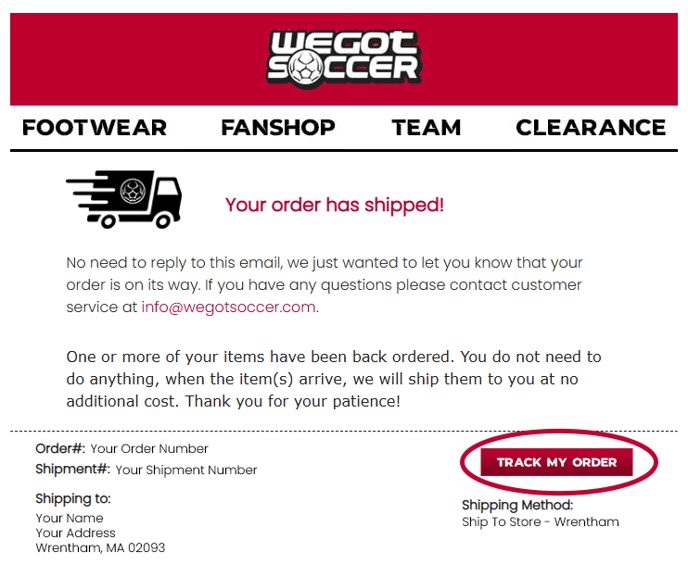
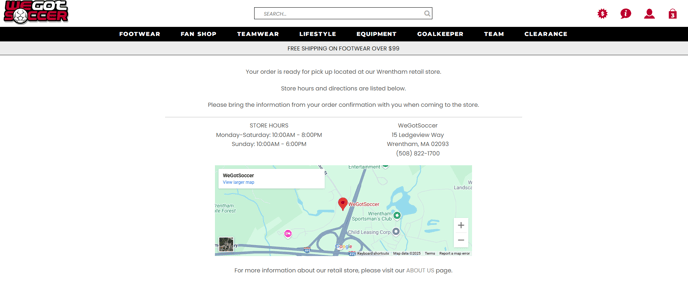
Clicking on the button will confirm if the order is available to pickup or not. You will be directed to the following page if the order is ready to pickup:
If the order is not ready to pick up, you will be redirected to this page:
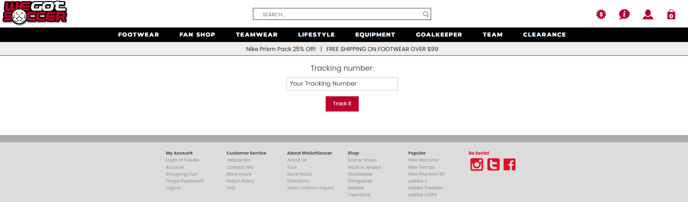
The tracking number for your 'Ship to Store' order will be automatically entered into this page. Clicking on the 'Track It' button will direct you to the shipping provider's website with further tracking information.
We thank you for choosing WeGotSoccer, the premier shopping destination for everything soccer!
Kind regards,
WeGotSoccer Customer Service Team